Save fishing spots on your own map.

Save your fishing spots on a map, add your own notes and return to productive areas on your next trip.

Download on the App StoreGet it on Google Play
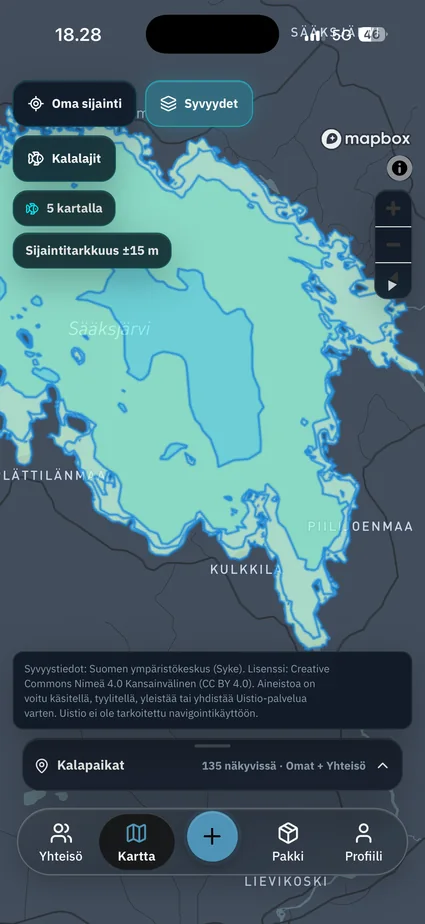
Fishing spots and depth contours in Uistio

Your places on one map

Mark fishing spots on your map and add observations, so the important areas from each trip are easy to find.

Exact locations are private by default

Exact coordinates are not published automatically; you decide separately what, if anything, to share with the community.

Return to productive areas

See your own markers on the map and use earlier observations to plan the next fishing trip.

Public map search returns up to 500 public fishing spots. This limit does not guarantee that every spot is shown when more than 500 match.

How to save your own fishing spot.

A fishing spot does not have to be a secret place where fish bite. It can also be a familiar shore or an area you want to remember for another trip.

  1. Choose the location on the map. Open the fishing spots panel, choose the add-spot action and select a point on the map.
  2. Give it a name you will recognise. A name and region are required. You can also add the waterbody and fish species.
  3. Check who can see it. The private option saves the spot for your own use. A community suggestion is submitted for review before it becomes public.
  4. Keep the trip’s observations too. Record the catch, lure and bite in your fishing log. The saved location and your notes help you plan another visit.

Study the water before your trip.

Depth contours help you examine underwater slopes and deeper areas on the map. In Uistio, you can switch on the depth layer alongside your fishing spots where the source data provides coverage.

How to read depth contours

A depth contour connects points of equal depth. Look at the depth values and the distance between the lines: for the same depth interval, closely spaced contours show a steeper change in the lakebed than widely spaced contours.

  1. Turn on the depth layer. Find the waterbody on the map and zoom in to the area you want to explore.
  2. Look for changes in the lakebed. Identify shallower and deeper areas and the slope between them. Contours show the shape of the bottom, not where fish are.
  3. Return to your own observations. Compare the area with your saved spots and catch entries. Check the weather and fishing conditions before the trip too.

Depth data and its limits

Depth information is provided by the Finnish Environment Institute (Syke) under the Creative Commons Attribution 4.0 International licence (CC BY 4.0). The data may have been processed, styled, generalised or combined for Uistio.

Coverage and detail vary. The map is intended to support fishing-trip planning, not navigation or the assessment of safe passage.

Private spots and community spots

Your own saved places and places shared by others can appear on the same map. Saving a place for yourself and sharing it with the community are separate choices.


A fish species guide on your phone.

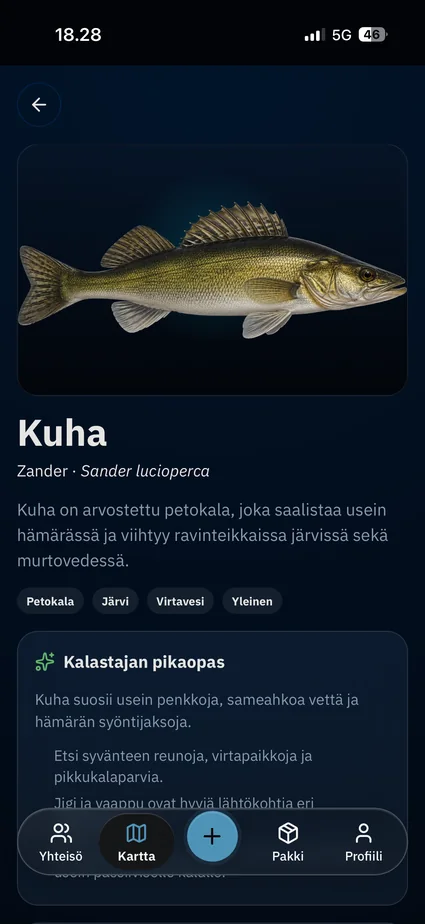
Zander species page in Uistio

Browse species such as perch, pike and zander, or filter the list by group and habitat. Species pages include an identification image, description and a quick guide for anglers.

The guide gives you context for the fish you are targeting. Once you record a catch, you can find that species again in your fishing log.

Questions about the map

Are saved fishing spots public?

No. Your own spots are private by default. You decide separately what to share with the community.

Does the map include depth information for every lake?

No. Depth coverage depends on the source data. Missing contours do not mean an area is shallow or safe to navigate.

Can I use Uistio for navigation?

Uistio is not intended for navigation. Do not rely on its depth layer to determine safe passage.

Why might a public spot be missing?

The public map search returns up to 500 public fishing spots. When more results exist, the result set does not guarantee that every spot is shown.